jesscoburn.com

Tidbits and thoughts on webhosting, web applications and just general cool geek crap.

Easy Panoramic Pictures with Panavue


One of the greatest things and worst things I ever did was purchase a digital camera.  In the past 4 years, I’ve built an online photo gallery of over 4GB and close to 8000 images.  I’m certainly no expert at digital photography and don’t really have the patience to become one, but I love “the cool stuff” and this blog post is about The Cool Stuff.

Like everyone else with a digital camera I love to stand in a spot and take a series of pictures in hopes of firing up Photoshop and stitching them together. Then when I get back home to the computer and decide to fire up photoshop, the reality that I know absolutely nothing about Photoshop or how to stitch a series of pictures together cleanly enough that they don’t look like a bunch of pictures just glued together hits home and I soon realized no only did I look like a dork spinning around trying to get a series of pictures but now I’m dork with a bunch of pictures from standing there spinning around! 

I asked a friend of mine (who is a digital camera and photoshop guru) what’s a great, easy to use (and ideally cheap) application for creating panoramic photos from a series of separate shots.  The application he recommended as easy to use (and affordable) was Panavue image assembler from panavue.com (at $64 it’s moderately affordable).

So as they say, a picture’s worth a thousand words and here’s a few of the pictures created with Panavue using default setting and pretty much just clicking “NEXT, NEXT, NEXT, FINISH”.  I’m sure as I spend more time creating more panoramic shots I’ll learn how to use it and how to create better pictures.

Chicago February 05

This picture was created from two different shots pasted together. I found creating shots from 2 pictures really gave the best results.

chicago05  

The above picture was created from these two pictures:

DSC00546 DSC00547

Greece 2006

greece1  

Which started out as these two pictures

img_0447 img_0448

 Buckingham Palace 2006

This is actually pretty interesting. Look at the lady with the white blouse and gray hair walking towards me and then at the lady smoking to the right of me. It’s the same person!buckingham-palace

These are the pictures that created this great view:

sta_1025 stb_1026

stc_1027 std_1028

ste_1029

Washington DC Spring 2007

This was taken from our hotel at the Mandarin Oriental in DC. It’s overlooking the Treasury (that’s the money factory on the left) and was composed from two separate photos.

hotel-view-dc

At the base of the Washington Monument.

washington-monument

In the Mall by the Smithsonian.

dc-the-mall   

 Key West Summer 2007

keywest-panarama

sunset-keywest

I know with a little effort and tweaking the settings of the application these images could come out even better. Now in a couple of them you can see where the images blend together (especially in Buckingham Palace and the Key West daytime picture above. However, I think the pictures really show just how powerful this type of application can be and just what kind of great pictures even an amateur like myself can take with a digital camera and a little digital photo cleanup.


This week at Tech-Ed Bob Muglia announced that IIS7 would be supported as a role in Windows Server Core 2008. If you’re not familiar with Server Core, it’s a trimmed down version of Windows Server 2008 with just the bare minimum bits needed to run.

Over the past few months we’ve had the great pleasure here at Applied Innovations to work with Microsoft and the IIS team at Microsoft as one of the earliest IIS7 Early Adopters. During the beta testing of Longhorn we had the opportunity to test Server Core and below is a short video of Carlos Caneja and myself discussing  our experience with IIS7 and Server Core with Microsoft’s own Mario Juarez and Eric Woersching (From the IIS Team).

teched-video

(pictured above, Eric Woersching, Carlos Caneja, Jess Coburn and Mario Juarez)

(clicking on the image opens a silverlight player in a new window and streams the video from my website)

What Does IIS7 on Server Core Mean to Web Hosters?

For AppliedI.net, IIS on server core represents Microsoft


I was recently asked if I provided feeds to my blog. I realized it’s not really displayed that I have a feed available for the blog. Since I use wordpress for my blog (running on a windows hosting account at AppliedI.net) it’s really quite easy to subscribe.

Subscribing to my wordpress blog via Firefox

When you access the site in firefox you’ll see a little RSS icon in the addressbar like this:

That tells you there’s an RSS feed available. If you click on it, the feed will display and you can subscribe to it using Live Bookmarks.

Subscribing to my wordpress blog via IE7

To subscribe to the blog access the blog in IE7, the browser bar you’ll see a little RSS icon:

Clicking on this ICON will display the feed. You’ll then be able to subscribe to the feed by clicking on the little star with the plus sign on it as shown below:

Clicking on that icon will subscribe you to the feed.

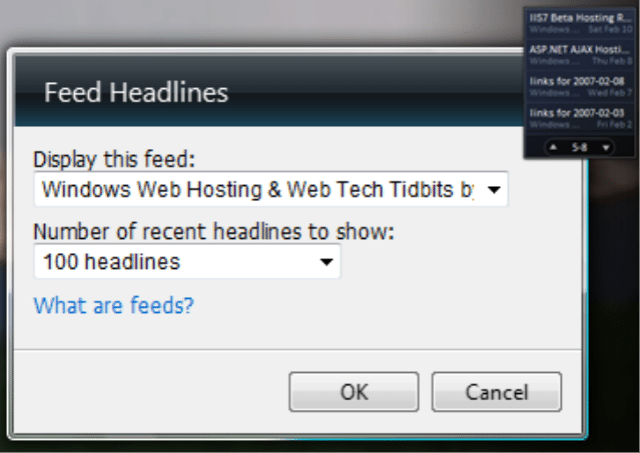
Displaying my wordpress blog in Vista using the Feed headlines gadget

Before you can add my feed to your gadget you’ll need to subscribe to the feed in IE7 as shown above.

If you haven’t already added the feed headlines widget to your Vista sidebar first do that. Then right click on it and select options:


From within the Options menu select my feed and click OK. Now my feed will display in your Feed headline gadget


  • 0 Comments
  • Filed under: The Cool Stuff
  • PHP 5.2.1 for Windows Lives


    Yes, it’s official, PHP 5.2.1 is now available for download as per this article at mvolo.com.

    What’s so exciting about 5.2.1?

    Performance, BABY!  Microsoft has been working with Zend to make PHP “rock solid” on Windows as well as working on a new FastCGI implementation.

    From Mike’s blog:

    You will also notice that the PHP 5.2.1 release contains an additional set of Windows binaries labelled “non-thread-safe”.  These binaries are compiled without thread safety, which provides an additional performance boost for PHP when running in single-threaded envrionments like CGI and FastCGI.  Be sure to download these binaries and try them out with the IIS FastCGI TP2.

    What’s this mean for me and you? Well we’re running FastCGI today on our free IIS7 beta servers where you’ll be able to take advantage of this. In the next few days we should have 5.2.1 deployed to the shared servers. We’re holding off a bit longer to deploy FastCGI on the production servers but it hopefully shouldn’t be much longer before it’s ready for production.

    You can download PHP 5.2.1 from php.net here: http://www.php.net/downloads

  • 0 Comments
  • Filed under: The Cool Stuff
  • ASP.NET Code Camp Sponsorship


    Today, Applied Innovations sponsored the ASP.NET developer code camp as a way to give back to the developer community. Organized by the FlaDotNet Usergroup, a local ASP.NET users group. Turn out for the code camp was amazing with almost 600 developers showing up to share information on topics such as:

    • ASP.NET AJAX, Windows Sharepoint Services 3.0, The new Lego Mindstorm and .Net Robotics and ofcourse, everything .NET related.

    As the local leader in ASP.NET hosting, the Applied Innovations booth was extremely popular. 

    To promote the code camp we setup a special offer just for code camp participants offering 3 extra months free, a free SQL database and free domain registration.  In addition to the special promotion we also gave away a year of VPS hosting.

  • 0 Comments
  • Filed under: The Cool Stuff