jesscoburn.com

Tidbits and thoughts on webhosting, web applications and just general cool geek crap.

Archive for the ‘Personal News’ Category

Introducing William Henry Coburn


Here’s William Henry Coburn, 8lbs 2oz, 19.5 inches (I’ll leave out the silly joke this time). Unfortunately my attempt to blog post from my cell phone via email failed miserably. But here’s a couple pictures from the first 24 hours.

First Williams Nursery (because I spent a god awful amount of time painting that darn thing)

nursery

Williams Very First Baby Picture (being held up by his mommy’s OB Dr. Newman)

williamsfirst

Daddy Snips the cord (not nearly as easy as it looks on TV but 10X more gross as you can see from the blood squirts)

daddysnips

Here’s the grandparents and Auntie Louise getting their first look at him (they still have those smiles on).

grandparents

Strike A Pose …

strikepose

Finally, Daddy doing for the first time what daddy is going to do the most for the next few years… changing the nappy…and dodging the stream of pee (he almost got me)

firstdiaper

3D Sonograph of the baby


I was attending The Parallels Summit this week and while up there the wife sent me a MMS picture on my phone.  The doctor had a 3D sonograph made so I give you the first 3D picture of our baby due sometime in June of 2008:

babyimage

Heading to Mix 08 Next week!


image I’m Vegas bound once again. . . . Seems I was just there in November?!?!  This trip though is all business (yeah.. uh huh in Vegas . . . Keep telling yourself that Jess).

Anyway, looks like MIX has sold out once again but if you’re heading to Vegas and want to meet up feel free to drop me a note.

So far I know the following guys are heading to Mix:

  • Myself & Carlos
  • Hosters like ourselves and I hear guys from crystal, discount, etc.
  • Microsoft Superstars like our buddies Joe Healy, Russ Fustino and Scott Hanselman.
  • The guys from BVsoftware / BVcommerce.
    This is going to my first year attending MIX but I’m told it’s the event to be at for Web technologies on the Microsoft Platform (which is pretty much everyone).
    Oh and if you’re in South Florida and heading out, Joe has a great post on his DevFish ( ><<<(o>) site.

Today we say good bye to Netscape


It was announced back in December that Netscape would be officially no longer supported as of February 1st 2008, for many they see it as just another forgotten software program but for many others it was much more than that. For me, Netscape is part of the events that got me hooked on the Internet and that eventually led to the start of Applied Innovations (it seems fitting that in the same month Netscape retires, AppliedI turns 9).

In 1994, I was just starting a career in Electrical Engineering at Motorola and had been using the Internet via gopher, FTP and USENET for a while already. I had been using NCSA’s Mosaic browser and HTTP Daemon running on SunOS and already building webpages and applications around it.  NCSA’s tools were nice but simply unpolished.  Then I read this USENET posting:

Mosaic Communications Corporation is a making a public version of Mosaic Netscape 0.9 Beta available for anonymous FTP.  Mosaic Netscape is a built-from-scratch Internet navigator featuring performance optimized for 14.4 modems, native JPEG support, and more.

You can FTP Mosaic Netscape 0.9 Beta from the following locations:

    ftp.mcom.com in /netscape
    gatekeeper.dec.com in /pub/net/infosys/Mosaic-Comm
    lark.cc.ukans.edu in /Netscape
    ftp.meer.net in /Netscape
    doc.ic.ac.uk in /packages/Netscape
    archie.au in /pub/misc/netscape
    ftp.cica.indiana.edu in /pub/pc/win3/winsock/nscape09.zip (PC only)
    mac.archive.umich.edu in /mac (Mac only)

Please make sure to read the README and LICENSE files.

An up-to-date listing of mirror sites can be obtained at any time
by sending email to rele@mcom.com.

Subject to the timing and results of this beta cycle, Mosaic Communications will release Mosaic Netscape 1.0, also available free for personal use via the Internet.  It will be subject to license terms; please review them when and if you obtain Mosaic Netscape 1.0.

A commercial version of Mosaic Netscape 1.0, including technical support from Mosaic Communications, will be available upon completion of the beta cycle.  Contact us at i@mcom.com for more information.

Have fun!

Marc and the gang
i@mcom.com, http://mosaic.mcom.com/

That post was dated October 13th 1994, 8:51am and the archived message pulled from google groups.

I quickly downloaded, installed and was AMAZED by this new web  browser and I wasn’t alone.  Here’s a few of the follow up posts from USENET that give you an idea of just how the Internet community accepted the Netscape Beta back then:

As blown away as you may have been by seeing the original Mosaic
for the first time, Netscape is even more impressive.

Besides being faster, easier to use and more rubust than Mosaic,
it elegantly handles news and mail.

It’s terribly, terrible impressive.

Looks great so far!  (Windows version.)

- Transparent GIFs are nice!
- Delayed inline-image loading a-la MacMosaic.
- Scrollbars on TextAreas
- Copy to clipboard from text.
- Multiple windows a-la XMosaic.
- THREADED news!

- AND…I’m POSTING this from Netscape!

Cool!

Let’s think of some of the things Netscape did that helped change the Internet:

  1. 1. They created a web server application with a easy to use management interface (no need to edit nasty .conf files)
  2. 2. They said F-U to the man time and time again and set their own standards for HTML and extended the Hypertext Markup Language.
  3. 3. They created the first commercial web browser (then free, then commercial, then free … )
  4. 4. IPO! Here’s a company that when it IPO’d it signaled the start of the DOT COM bubble!
  5. 5. It simply made the Internet more accessible to all, it went from a tool used only by scientists and geeks to a key component of everyone’s daily life. You no longer needed to know secret geek-speak like GOPHER, FTP, USENET or TCPIP you could just point and click your way around the web.

For many the passing of Netscape is just another antiquated  piece of software taking it’s place in history but it’s much more than that and because of all it’s done and changed for myself, my company, and society as a whole, I say raise your cup of coffee this morning and give thanks to Andreessen and the guys that started Mosaic Communications Corporation and released that very first beta version of Netscape, they truly changed our world!

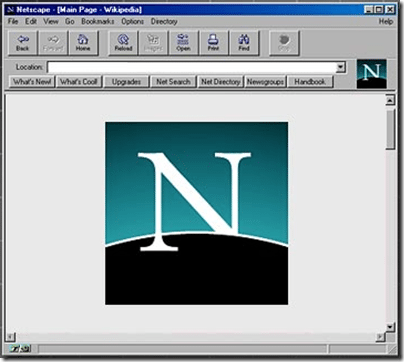
image

(image from Peter Coffee’s 24 Killer Apps of All Time).


At home I’ve had a homebuilt P4 3.2GHz desktop for a while now, it’s done me well but new video cards, faster multi-core processors and ofcourse Vista…  it was time to build a new box.

Recently Scott Hanselman posted about his new Ultimate Gaming Machine he had built up and I was inspired to build my own super quiet super-rig but couldn’t bring myself to drop the $2500 it was going to cost to build a box just for fun…  So what does a cheapskate do?

So enters SlickDeals.net.

One of my favorite websites on the Internet is slickdeals.net, here you can find all the best ’slick deals’ everything from super cheap promotions to amazing coupons and rebates.  Everyone that knows me teases me because I check this site 3-4 times a day for that slick deal.

Last week, the need for a new machine hit me again and slickdeals delivered this little morsel:

HP Home has a new $400 off $1000+ coupon DT4115 valid customized HP Pavillion Desktops. Thanks Selma

A well-equipped HP Pavillion m8100y Media Center/PVR desktop PC for a base price of $899

  1. Click here
  2. Click "Customize"
  3. Select the following options (or choose any other upgrades for $100 or more):
    1. Intel Core 2 Quad processor Q6600 (2.4GHz) [add $150]
    2. FREE UPGRADE! 2GB DDR2-667MHz dual channel SDRAM [add $0]
    3. FREE UPGRADE! From Xtreme Audio to Sound Blaster X-Fi XtremeGamer or FREE UPGRADE! From integrated to Sound Blaster X-Fi Xtreme Audio [add $0]
  4. Checkout, apply $400 off $1000 coupon DT4115
  5. Your total will be $650 + applicable taxes with free shipping

Specs:

  • Genuine Windows Vista Home Premium (32-bit)
  • Intel Core 2 Quad processor Q6600 (2.4GHz)
  • 2GB DDR2-667MHz dual channel SDRAM (2×1024)
  • 64MB NVIDIA GeForce 7500LE, DVI-I, TV-out, VGA adapter
  • 250GB 7200 rpm SATA 3Gb/s hard drive
  • LightScribe 16X DVD+/-R/RW SuperMulti drive
  • 15-in-1 memory card reader, 2 USB, 1394, video
  • ATSC-NTSC TV tuner with PVR, FM tuner, remote
  • Sound Blaster X-Fi XtremeGamer or Sound Blaster X-Fi Xtreme Audio
  • Norton Internet Security 2007 - 15 Months
  • HP keyboard and HP scroller mouse
  • No Monitor (unless additionally selected)

Alternative upgrade options (choose one)

  • Intel(R) Core(TM) 2 Duo processor E6850 (3.0GHz) [$50 less, $600 total]

Now how anyone object to: A Quad Core CPU, 2GB memory, a 250GB SATA drive, a sound blaster sound card and a TV tuner with PVR, FM and remote control and to top it off Windows Vista Home Premium (which includes Windows Media Center) for $650!!.  It was simply a score, So I went for it.

Unfortunately it did have a couple shortcomings that kept it from being a super-rig:

  • Only 1 SATA drive (and only 7200RPM), ideally RAID 0 or RAID 10 - fortunately the motherboard supports this.
  • The video card options were weak.
  • The 350W power supply was no doubt going to have to be replaced with something else.
  • Certainly not showstoppers and nothing that couldn’t be resolved.

    Bring Forth the Video & Power

    The box arrived yesterday and upon looking in it, it was questionable if a large video card would fit in there.  A quick trip to the local CompUSA and $450 later we have a 8800GTS Video card and a 600W PCI-E ready powersupply. Those others wondering if the 8800GTS series video card will fit in a HP m8100y can be happy to know it’ll fit, you may never be able to get it out, but it will fit!

    Here’s The Numbers…

    Before the video card and power supply swap we had this:

image

After the video card swap out:

image

We went to 5.9 across all the video scores with only RAM & Disk I/O keeping us from a perfect 5.9.

What’s next?

Getting 5.9’s across the board ofcourse!

The RAM and Drive upgrades will come in a couple weeks as I’m also still debating if I should make the jump to Vista 64bit or stick it out with 32bit and will have to decide that first.  Ofcourse, many wll argue it’s not a super-rig  until it’s the ideal super-rig (Like Scott’s) with two video cards with SLI for video and dual monitors but I don’t have space in the new box for a second video card and the current card can support 2 DVI monitors as well as HD output.

My super-rig will be used as a media pc / gaming pc more than anything else so giving up the second video card for a TV-tuner/PVR card is acceptable.

But thanks to slickdeals.net I managed to build an almost-complete super-rig for about half of what I would have spent building the entire machine myself and probably 1/3rd what I would have spent if I spec’d out a similar machine through Dell, etc.

Now I just need to find a slickdeal on a 30" LCD monitor!

The final outcome

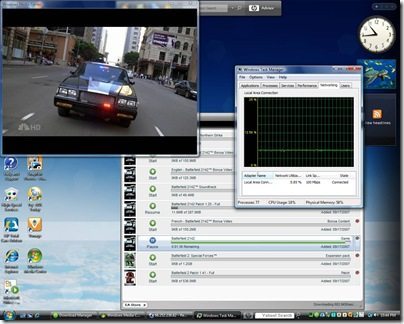
And here’s a little screen shot of what was going on last night:

clip_image002