
Microsoft's shift toward cloud-first computing eliminated the traditional PC migration wizard, forcing organizations and users to rethink document management strategies. The solution lies in leveraging OneDrive's native integration with Windows to create a seamless, cloud-synchronized document environment.
This approach addresses a critical business continuity challenge: ensuring document accessibility across devices while maintaining familiar user workflows. Here's the strategic implementation process.
Prerequisites and Planning
Before beginning the migration, ensure OneDrive is installed and properly configured on all target systems. Consider your organizational structure when planning folder hierarchies—multiple devices may require distinct naming conventions such as "Office-Documents" or "Laptop-Documents" to maintain clarity across your device ecosystem.
Implementation Process
Step 1: Establish OneDrive Folder Structure
Navigate to your OneDrive folder and create a dedicated subfolder for your Documents content. Right-click within the OneDrive directory and select "New Folder." Choose descriptive names that reflect device or location-specific usage patterns to avoid confusion in multi-device environments.
Step 2: Redirect Windows Documents Library
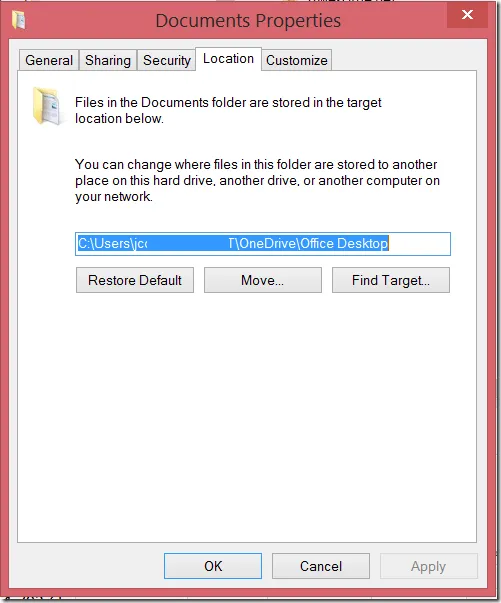
Access the Windows File Manager and navigate to C:\Users\[username]. Locate the "Documents" folder, right-click, and select "Properties." In the Properties dialog, click the "Location" tab.

Update the location path to point to your newly created OneDrive subfolder. Windows will prompt you to migrate existing files—accept this option to ensure complete data transfer.

Strategic Benefits
This configuration creates several operational advantages:
- Automatic synchronization across all connected devices
- Seamless backup without user intervention
- Consistent file paths maintaining application compatibility
- Enhanced mobility for remote and hybrid work scenarios
Modern Relevance
While this technique originated during the early cloud migration period, it remains fundamental to modern hybrid work strategies. Today's distributed workforce requires this level of document accessibility, making OneDrive integration a critical component of organizational IT infrastructure.
The same principles apply to other Microsoft 365 applications and services, creating a comprehensive cloud-first document management ecosystem that scales with business growth.