jesscoburn.com

Tidbits and thoughts on webhosting, web applications and just general cool geek crap.

Archive for the ‘Virtualization’ Category


A new version of the Linux Additions for Virtual Server is now available from the Microsoft Download Center via the following webpage:

http://www.microsoft.com/technet/virtualserver/downloads/linuxguestsupport.mspx

These new Additions add support for some updated distributions of Linux and are designed to work with Virtual Server 2005 R2 SP1 which is available at http://www.microsoft.com/windowsserversystem/virtualserver

Currently Qualified Linux Guest Operating Systems

The following Linux operating systems have been tested and are on the list of supported guests for Virtual Server 2005 R2 SP1:

Enterprise distributions:

  • Red Hat Enterprise Linux 2.1 (update 7)
  • Red Hat Enterprise Linux 3.0 (update 8)
  • Red Hat Enterprise Linux 4.0 (update 4)
  • Red Hat Enterprise Linux 5.0
  • SuSE Linux Enterprise Server 9.0
  • SuSE Linux Enterprise Server 10.0

Standard distributions:

  • Red Hat Linux 9.0
  • SuSE Linux 9.3
  • SuSE Linux 10.0
  • SuSE Linux 10.1
  • SuSE Linux 10.2

Here’s Jess’s top 10 tips and tricks to help optimize your Windows VPS server running on Virtuozzo. 

  1. Disable Indexing Service
    Unless you’re using the FrontPage search bot you generally don’t need indexing service running and you should disable it.
  2. Defrag your drives
    Disk I/O is king, especially in a VPS and you should be regularly defragging your drives in your VPS just as you would in a physical server.
  3. Don’t run antivirus in the VPS
    Antivirus should always be run from the host node and on our servers it is. We use either AVG or McAfee on our hardware nodes.  This doesn’t mean you have to accept virus infected emails. Configure your mail client to allow a suitable delay in email delivery (I recommend 60 seconds if you can, otherwise 30 should be sufficient) and the hostnode antivirus will take care of the rest. 

    Smartermail installs clamd these days and I recommend you disable it and not use it. It’s proven to be quite the resource hog.

  4. Don’t run spamassassin
    Disable spamassassin checks in your VPS when running Smartermail. If you absolutely have to have spamassassin running with your VPS you should run spamassassin on a Linux dedicated server or vps and remotely connect to it in smartermail, this works great and allows you to make use of threading.
  5. Enable Windows Firewall and secure your VPS
    This is a must. Although the kernel is protected in your VPS, you’re still responsible for security in your virtual private server. Enable Windows Firewall and configure it.

    While on the topic of security you do not have to install OS updates, these are managed at the host-level. However you do need to remain aware of new updates and install them for any other server software you may have installed on your windows vps server such as SQLexpress updates, Smartermail updates, etc.  If you’re using Plesk you can request support to update Plesk for you as it’s installed through an application template. Verify things like open-relay mail servers are not enabled, anonymous FTP uploads are disabled, etc.

  6. Whenever possible use an application template.
    Application templates save memory and diskspace on your VPS.  An example of this is the OS install on your VPS. With just Windows your VPS uses about 150MB of diskspace, yet a full install of the OS uses about 4GB of diskspace. In fact an install of Windows Server 2003 on almost every other virtualization platform will use 4GB of diskspace.  This is a huge savings.
  7. Close your Terminal Services sessions and logout, do not just disconnect. 
    Each active Terminal Services session uses about 20MB of memory.  When you consider each VPS has generally 2 TS sessions (3 if you include the fact you’re able to TS into the console by using the command mstsc /console /v:YOUR_SERVERNAME ) and figure about 30 active VPSs on a machine that adds up to close to 2GB of memory that would be wasted memory on a server.
  8. Some applications when installing may require you to connect to console port.
    One such application is Windows Sharepoint Services 3.0. To connect to the console port use the command from dos:  mstsc /console /v:YOUR_SERVERNAME  where YOUR_SERVERNAME is your VPS host name.
  9. Don’t forget that you can manage your VPS through the Virtuozzo Power Panels,
    This includes tasks such as stop, start, reboot, backup, restore and even mount the filesystem without turning on the VPS.  To access the management port go to:  https://YOUR_SERVERNAME:4643/   where YOUR_SERVERNAME is your VPS host name. Remember when connecting to a port you have to explicitly type http://YOUR_SERVERNAME:PORT/  and not just type YOUR_SERVERNAME:PORT.

    There is a bug in the virtuozzo power panels that it may throw errors and say contact your hosting provider. If you get these errors the first thing you should do is go to preferences and set the timezone to your local time zone and not leave it to server default.  This generally fixes that error and a bugfix is due out shortly from SWsoft to fix this known issue.

  10. Configure your SQL services or better yet use shared SQL.  These days any web application is going to require a SQL database be it MSSQL or MySQL.  My recommendation is use a shared SQL database on a shared database server. Today SQL hosting is pretty cheap (about $10/month for 100MB is the norm) and networks like ours use a dedicated gigabit network for internal traffic so any latency connecting to the SQL server would be offset quickly by the amount of memory and Disk I/O you’d save by not running SQL on your VPS.  If you must run SQL on your VPS though then make sure you set a memory cap on the SQL service or you’ll find before long it’s using all your memory on your VPS and your apps will be starving for memory.
  11. What? 11? You said there was only ten.  Consider this … The Bonus Tip:  Backup, Backup, Backup. 
    With any server it’s important to have backup copies of your web content, databases and any information that’s vital to the operation of your websites and online business. This is the same with VPS servers.  No matter what any host tells you, you should never rely on just one backup or on someone else to manage your backups for you. You should always maintain a local (as in, your local desktop computer in the office or at home) copy of your website and website details.   I have heard horror stories time and time again of this and it always starts as “Well, I assumed  THEY/HE/SHE/THEM/YOU/(Anyone else but me) was doing backups and they just worked!”  What’s the problem?    The problem is backups go bad, files don’t restore, media fry, drives fizzle and bits get lost.  It happens and if anyone tells you it doesn’t happen don’t trust them, keep a local backup of your sites.  Think about this, and we’ll use this scenario instead of thinking of exploding U-Hauls full of fertilizer or natural disasters. One day all of the employees of your hosting company pool in $1 for a lottery ticket and a chance to win a billion dollars. They hit the lottery and each walk away with $100 million (much happier story than that flaming u-haul truck).  During all the celebrating, they decide to have a weenie roast in lobby of the building, the flames get out of control the building, the servers and the backups go up in flames. The new billionaires decide there’s no way they’re fielding those calls and take their new found wealth buy a island in the Caribbean and retire.  All your backups with that host are lost and anyone that knows how to restore your backups is off searching for buried treasure in the Caribbean. It will take ages to ever restore your backups. But if you have a local copy of your data (even if it’s a week old or month old), you’ll be back online and able to rebuild your site within a few days. Backup Backup Backup.

Those are my tips. When it’s said and done the common sense solution is this.  VPS’s have two resources they need to manage the most, that’s memory and disk I/O.  Everything you can do to minimize or optimize your usage of these two resources will improve your VPS performance. I’d love to hear from anyone else that has any recommendations on how to improve the performance of a VPS/VE running on Virtuozzo for Windows.


It’s no secret I’m a big fan of Virtuozzo virtualization software from swsoft.com. I think for a hosting platform it’s really the best solution on the market today and we’re basing our entire VPS hosting solely around it.

Recently in preparation for our release of windows VPS hosting (very soon) we brought everything up to date including taking Virtuozzo to 3.5.1 SP1.   Normally, an SP1 means major changes and this is no exception.

Virtuozzo 3.5.1. SP1 adds a ton of new features but my favorites are:

Improved Diskspace Control in Virtuozzo

Added was the ability to use dynamically increasing diskdrives (they call them compact disks). In the Linux version a client could subscribe to a 20GB Diskspace allocation and would only use as much space as their actual usage was. This means total disk usage would be lower as most clients really never use their total allocation. In fact the accounts I resized today all were 20GB partitions and the average actual partition was under 4GB. 

While we’re on diskspace, Virtuozzo is just bad ass. OS virtualization doesn’t need to create duplicate copies of the OS so when a client gets a 20GB partition only about 300MB or so is actually used for the OS the rest is all shared with the host machine.


Memory Control and Allocation in Virtuozzo

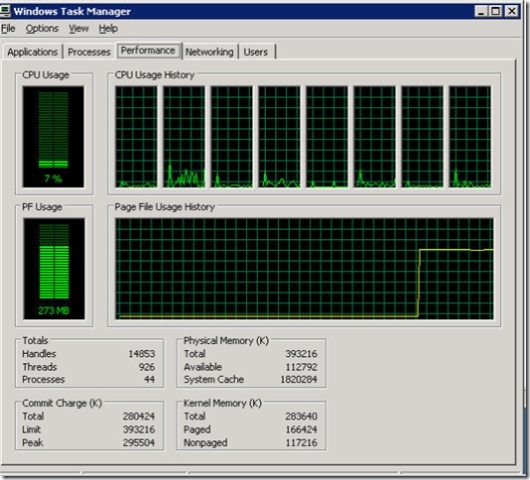
This isn’t really a feature of SP1 but probably improved within the patch somewhere so I’m including it here. Below is an image of a client’s virtual node (yeah we use dual processor, dual core xeons and serial attached SCSI drives in our VPS servers). The client was initially set at unlimited memory because we wanted to see if memory was a problem for his VPS. We then switch his memory from unlimited to a cap of 384MB.

The image below is pretty cool he was uncapped on memory so the line stayed at the bottom (let’s say 10%), once we set a cap it jumped up immediately about 70%. In real-time.  How cool is that. Dynamically adjusted his memory allocation WITHOUT having to reboot his VPS. Zero Downtime, that’s what it’s all about.


Your VPS can now be a VPN Client

A big request has been that your VE be able to connect to a VPN. Until now this hasn’t been possible but now it is. I’m told in Virtuozzo 4.0 you’ll be able to run a VPN server too!

Enable Strict CPU Limits In Your Windows VPS

With Virtuozzo you can set a CPU share so that each VPS gets a certain amount of the CPU, larger plans can have a larger slice, etc.  Now you can also set a max CPU usage. What’s this mean? Means you can set a cap on just how much maximum CPU they can get. With Virtuozzo a VPS can burst to 100% available CPU (available CPU is defined as total CPU minus the sum of guaranteed CPU across all active VPSs). So now you can set it so that VPSs can only burst to 25% or 50% total CPU, etc. Why is this good? Keeps one VPS from bogging down the total available CPU and also allows you to offer a higher burst limit to larger VE’s.

Each VE has it’s own Console

Now you can use Terminal Services, Citrix, Radmin, vnc or any other remote management tool you prefer and not just Terminal Services as each VE/VPS has it’s own Console.  Seems like a small change but it’s just another example of Virtuozzo narrowing the gap between OS virtualization and HW virtualization and offering a robust windows virtualization solution.

You can manage Windows Firewall Rules!

Yeah, I’m not sure just when this was added honestly because I assumed it just didn’t work at all but you can now define Windows Firewall rules within your VPS.

Here’s a tip: don’t forget to setup the exception for terminal services before you enable your windows firewall! If you forget to do that you’ll find yourself locked out. Fortunately though with the Virtuozzo Power Panels enabled (https://yourip:4643) you’ll be able to log into that and turn off the windows firewall service and can then go in and fix your rules so you’re not completely locked out.

Other features added

There are other features added that are equally cool but not really relevant to my needs or those of my clients but for completeness: Ethernet Layer Network Adapter Support is supported so that a NIC can be assigned to a single VPS. Windows 2003 Network Load Balancing support has been added, Teamed Network Adapters are now supported, Citrix Presentation Server supported and they added new CLI commands.


I know it seems like I’m paid for this stuff, but I’m not. I’m simply excited about technology when it’s “BAD-ASS” and Virtuozzo is simply BAD ASS Technology. Virtual Private Servers are the future of shared hosting, reseller hosting will slowly evolve into Virtual Private Server hosting as resellers continuously want more control of their servers. Dedicated Hosting will be replaced with Dynamic Dedicated Servers and shared hosting will all run within dedicated VPSs. I believe SWsoft is on the leading edge of this technology and that’s why we use them for our system.  I blog about it because I’m excited and I want the world to know just how cool it is. Ofcourse, if the world wants a windows vps hosting account then I hope they select Applied Innovations and that’s

  • 0 Comments
  • Filed under: Virtualization

  • A follow up to Smartertools answers the cry on the fight against spam with smartermail 4.0.

    Alot of clients have been asking about how we’re handling spamassassin with Smartermail 4.0.  It’s no secret that spamassassin on a windows server runs horribly slow. If more than a handful of domains are involved I have no doubt that spamassassin would cripple the server if not fail completely.  However I also believe that greylisting is the more effective component in the smartertools anti-spam arsenal and will reduce spam to a fraction of what it would be with just spamassassin alone.

    So there’s a ton of interest in farming out spamassassin to a Linux vps. Why, you ask?  Well quite simply spamassassin runs like a mad cow on steroids on a Linux server. Okay maybe I’m exaggerating but it’s a ton faster. Plus as hard as it is to admit it, being a die hard windows geek, it was developed on Linux and the community support for is still very much linux so it just runs better.  Fortunately, smartertools (under the leadership of Tim Uzzanti, formerly of Crystaltech and my two superhero-style developer home-boys Grady W and Bryon G) saw ahead and knew this could be a problem. What did they do? They devised smartermail to support not only a remote spamassassin processing server on linux but if need be a farm of spamassassin processing servers. By going with a linux install of spamassassin you’ll gain the added support of the spamassassin community (also linux geeks er um developers .. ehh linux developer, geek … same thing ;) ).

    What’s so great about Spamassassin on Linux?

    Out of the box spamassassin isn’t very effective. Okay, it’s good but not nearly as good as it should be. To really take advantage of spamassassin you’ll want to add a few functions:

    • DCC, DCC is the Distributed Checksum Clearinghouse. Basically your server creates a checksum from messages you receive compares this checksum to a distributed database of checksums to decide if the message is spam or not and then scores it accordingly. Basically you and a bunch of other mail server operators are teaming together to create a distributed, constantly updated database of spam and non-spam messages. Very cool.
    • Vipul’s Razor, is similar to DCC but uses the Cloudmark Spamnet network (my understanding is it’s the same database that backs their commercial services).
    • Pyzor, Similar to Razor, Pyzor is a completely free database and client written in .. you guessed .. python. It was developed out of fear that the Razor database being commercial may be ripped away from the opensource community at some point.

    Now, these three tools will slow down your message processing (around 2-10 seconds generally and you should set a timeout so that they don’t hold up email too long) but they really add some power behind Spamassassin.

    You now have evolved from the rules only processing of spamassassin into a rules processing system combined with a series of independent distributed message clearinghouses. I should note that if you have any volume whatsoever DCC is going to want you to setup your own DCCD (which we have setup currently but are still beta testing smartermail 4.0 before rolling out completely).

    Why Rules? Don’t the Spammers Know These Rules too?

    So now you have the default rules (around 91 I believe) and the clearinghouses. But what good are the rules right? I mean afterall if I have them the spammers have them too. Now enter the SpamAssassin Rules Emporium (SARE) a series of frequently updating rules that you can download at various times updating your rules using a tool like sa-update. This means your rules are constantly evolving just like the spammers are.  Now we got kerosene on the fire. We have a set of consistently changing rules (which you’ll want to pick from carefully remember these could be touchy and some rules may flag good mail as bad) and a series of Independent distributed message clearinghouses. 

    A note about rules from SARE: There are different levels of rules, some that when tested against a mail test database picked up only spam messages but not all of the spam messages, some that picked up more spam messages but flagged a few good emails as spam too and finally some that picked up all the spam messages but flagged more ham as spam. It’s really up to you to decide what’s safe and what’s now.

    Which rules do you deploy? Our own testing has shown that greylisting filters 90% of the spam and that spamassassin does a good job of flagging almost all of those that get through greylisting with just the safe level of rules employed. We have about 501 tests we run each message through currently and it takes between 1.2 and 5 seconds without the distributed database checks, with the database checks it takes 1.2 seconds to 20 seconds. Now our system hasn’t been fully optimized and tweaked yet but it’s getting there.

    Rules and DCC what else does Spamassassin Give me?

    So now we have a constantly updating database of rules, a way to compare our messages to a distributed database of email signatures to see if others have flagged them as spam and… here’s the coolest part. You know those annoying image emails you get selling viagra or stocks? That you can’t for the life of you figure out how to filter? Well spamassassin has OCR (object character recognition) plugins available that will read these messages and then review the text to see if it’s truly spam. This is VERY cool!  But as the cat and mouse game goes, have you noticed that your image spam is becoming colorful now? Strange backgrounds? Multi-colored text? You know all those tricks we perform with CAPTCHA to keep bots from registering on our forms? Yeah the spammers are using those techniques in spam messages now (the rat bast*rds).

    The Spam Fighting Duo becomes a powerful Dynamic Trio!

    Spamassassin is very cool and Smartermail has gotten even cooler. Now enters the final member of our Team of Superhero Techno-tools, SWSoft’s Virtuozzo.  Virtuozzo is a OS virtualization VPS engine. What’s this mean? Hardware virtualization systems like Microsoft Virtual Server and VMWare have a overhead (reported on the order of 20%) due to virtualizing the hardware. This means 4 VPSs on a single server will only deliver the processing power of the single box at 80%. With hardware virtualization you gain a great deal of flexibility in being able to run mixed guest operating systems on a host system (IE, running Linux and Windows VPS’s on a Windows Host machine) but you pay for that with a performance loss (most argue with today’s processing power it’s an acceptable loss but you decide for yourself).

    With OS virtualization you are still very much virtualized but you run the same Guest OS as the Host OS so you can’t run Linux on windows. But guess what? You aren’t getting bottlenecked as you are in HW virtualization.  Now Virtuozzo gets even cooler. You get all the raw power, plus now that you’re using the same OS at the Host and across all of your guest OS’s they can actually share common memory and diskspace. So the 2GB of diskspace you’d normally lose in a 10GB VPS partition isn’t lost at all. You only give up any diskspace for files that differ from the host machine’s version (for instance if you created your own bind binary it and it’s necessary libraries would be unique to your vps and use your diskspace and memory allotment of your VPS servers) I believe this is around 100 to 200MB on average.

    Next you get something called Virtuozzo templates. These are ready made application, operating system and in some cases full VPS machine templates that are shared across multiple VPS virtual engines (VE’s or VPSs if you will). So now you can have a series of very similar VEs (vps’s) running on a single hardware node all sharing resources. This means although your apps and virtual machine is very much separated and secure you’re not running all of the overhead of the guest operating system on your virtual machine and you’ll gain performance over a HW virtualized system. Our own informal testing showed this to be a great benefit and very much worth the tradeoffs between HW and OS virtualization for a hosted application and webhosting platform. 

    So why Virtuozzo for our spamassassin VEs?

    • The performance difference between HW virtualization and OS virtualization. HW virtualization is great, adds alot of functionality that you may or may not need and will get the job done but OS virtualization is the only way to go in a production hosting environment that demands maximum performance, reliability and scalability.
    • Shared OS resources reducing the need for redundant processes and diskspace waste. Allowing for more VPSs per HW node and thus lower cost.
    • The ability to create templates of a working VPS design and then replicate it across hundreds of VPS’s within a matter of minutes (I didn’t really get into that but it’s extremely cool)
    • The ability to patch a single VPS and then create a template for this patch and replicate it automatically across all VPSes.
    • The ability to move a VPS from one HW node to another HW node with near zero downtime (again extremely cool)
    • Finally, it’s a platform we’ve already adopted and have been using for about 3 years now and are extremely familiar with it and find it quite popular in the hosting industry.

    I know there’s already been a ton of work on a VMWare image in the smartertools community and this is without question trail blazing efforts. For many servers the ready built solution is a clear winner. I mean afterall how many admins are going to have a Virtuozzo Linux HW node sitting around? Please don’t think I’m downplaying this solution or the great benefit this donation to the community has been, it’s a very very clever solution.  But I honestly believe the more practical solution is a dedicated Linux VPS. Under high loads any mail server is going to slow down and require maximum disk I/O. Dedicated some of this disk I/O to a VPS engine on the same machine (using HW virtualization no less) is going to come at a cost and potentially not provide the performance required.

    Side Note: Early on our shared mail servers were using SATA raid arrays.  SATA drive I/O is known to burst to SCSI levels but won’t sustain those levels. As a result we had no choice but to move from SATA to SCSI and that was the only difference between the two configurations. Disk I/O is king in a mail server and fast drives and plenty of them in a RAID array is the only way to go for a mail server. Giving up some of this disk I/O to a collocated VPS scares me in our own environment. Your environment is probably much different and may or may not have the same issue but that’s for you to decide.

    We’re creating these VPS engines so that we can offer not only a farm of Spamassassin servers for our shared hosting mail servers that we’re able to dynamically add additional nodes to quickly, but provide dedicated managed Spamassassin VPSs to our dedicated hosting clients and potentially mailserver admins worldwide regardless of where their mail servers reside.

    Think about it, a plug and play spam fighting solution. This may not be an original Applied Innovations “Innovation” (that distinction goes to: someone_else )but it’s definitely one we’ve taken to the next level and that my friend is just why our company is named Applied Innovations, it’s not just a name, it’s what we do.


    The Applied Innovations Spamassassin VPS solution is currently available in beta mode. It will be fully available following the completion of our beta testing. If you’re an Applied Innovations dedicated hosting client and need a spamassassin managed VPS online today, let us know and we’ll quote you a price.


    I recently posted a blog entry about my ‘informal’ apples to oranges comparison of the different virtualization platforms available for windows. Apparently I didn’t spell it out clear enough that things were not on a level playing field.  Well, guys I did it. I went and pissed off Bob. Sorry Bob.

    But Bob taught me a couple lessons:

    first don’t post half a**ed comparisons without coming out and telling everyone they are half a**ed comparisons and making it blatantly obvious they are half a**ed. I thought I described the different hardware that I had available at the time and mentioned that I had a brand new server on the way to do a real benchmark. He’s 100% correct though so I’m saying it here:  Guys my benchmark from 10/1 is half-assed! There I said.  (but you can bet your a** I’m going to be very thorough in my next test using the same exact machine all running only ONE virtual instance!)

    second, read the EULAs & PURs! (that’s End User License Agreement and Product Use Rights) before you go doing something stupid like creating a half a**ed comparison and posting your results on the Internet.  So basically don’t just click “I Agree” and run off installing that application.

    So here’s what I learned:

    1. VMware’s EULA states:

    You may use the Software to conduct internal performance testing and benchmarking studies, the results of which you (and not unauthorized third parties) may publish or publicly disseminate; provided that VMware has reviewed and approved of the methodology, assumptions and other parameters of the study. Please contact VMware at benchmark@VMware.com to request such review.

    Okay so I can share my results with others just I can’t publish them or publicly make them available. Seems like privately sharing my results is okay though?

    2. Microsoft’s Product Use Rights (a 66 page word doc of legalese) says:

    i. Software. You must obtain Microsoft