Microsoft Teams Plans: Free, Premium, Departments, Frontline or Education? Compare & Choose the Best
Explore Microsoft Teams Plans for every need—free, premium, or tailored for departments, frontline, and education. Find your perfect fit today!
Explore Microsoft Teams Plans for every need—free, premium, or tailored for departments, frontline, and education. Find your perfect fit today!
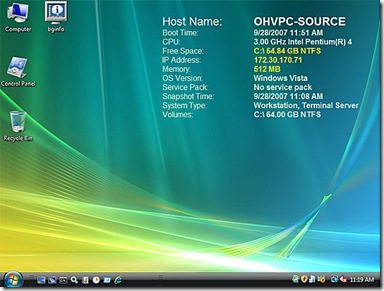
Got one of my daily Microsoft email newsletters today and it detailed a couple new tools from Sysinternals (the guys that bring up such great tools as filemon and procmon) BgInfo v4.11 Released. There’s a new version of BgInfo. BgInfo creates a background image with various information about the machine you’re working on at the
A couple new tools from Microsoft’s SysInternals Read More »
I upgraded my home PC to Vista today from XP Mediacenter edition and earlier this week I had an email that the new OneCare 1.5 beta was released and “NOW WORKS WITH VISTA”. So I figured I’d install the new version of OneCare. First, you have to uninstall OneCare before installing a new version, the
Uninstalling Windows OneCare in Vista RC2 Read More »
My version of Windows Live Writer wasn’t pinging all of the sites on my blog ping list. Turns out Windows Live Writer has an extensive logging capability. To access the WLW logs enter the following at a command prompt and it will open the Windows Live Writer Log in notepad: %userprofile%\Local Settings\Application Data\Windows Live Writer\Windows
Accessing Windows Live Writer error logs Read More »
I’ve been looking at Text to Speech Flash applications trying to find that something that would allow me to dynamically generate a TTS based flash animation and have had zero luck. However, during my search I came across crazytalk from www.reallusion.com. This thing is hilarious. Unfortunately, it wants you to use it’s own ActiveX plugin to
CrazyTalk to Create Flash Videos Read More »
Now that I'm a firefox user, I figured it would be worthwhile to post a list of useful firefox links and plugins so here they are: The firefox cheat sheet: http://lesliefranke.com/2006/06/22/mozilla-firefox-cheat-sheet-update/ SearchStatus – provides a PageRank & Alexa Rank notice for all sites at the bottom of your browser. May not be all that fancy
Firefox Cheatsheet Read More »
Well the master of the one ups has one upped VMware, making their Enterprise Edition of Virtual Server 2005 FREE! Best of all when run on top of Win2003 Enterprise Edition R2 you get 5 Virtual machines free. You can pretty much guess what platform we'll start seeing windows virtual servers popping up on all
Microsoft Virtual Server 2005 Enterprise Edition FREE! Read More »
Microsoft, Dr. Dobbs and O'REILLY are offering Free ASP.net 2.0 training with courses for JSP, PHP and Coldfusion developers looking to migrate over to the dark side. To sweeten the pie you also get a nice pack of freebies, including a copy of Visual Studio 2005 Standard Edition, a 50% discount on a MCP exam
Free copy of Visual Studio 2005 Standard and Free ASP.net 2.0 Training Read More »
Microsoft has recently released updated CTPs of their Expression Interactive Design and Graphics Design applications (personally I can't wait to see the Web Design application when it's released or atleast made available via beta). You can get details on what the Expression product line are at: http://www.microsoft.com/products/expression/en/default.mspx The Expression Dev Team has a blog online
Microsoft Expression Interactive and Graphic Design Free Betas Read More »
Microsoft has an article available regarding Virtual Server 2005 R2 and iSCSI. I've been digging around on the forums and it seems the only way to really get the performance out of this is by having the iSCSI storage on the actual host machine. I haven't played with it, don't know enough about it but I do know iSCSI
Virtual Server 2005 R2 & iSCSI Read More »