Tidbits and thoughts on webhosting, web applications and just general cool geek crap.
3 Oct
WordPress 2.3 was released on September 25th. This release of WordPress brought some great new features:
Earlier in September Windows Live Writer, Beta 3, was also released. This latest build of WLW brings with it:
Together WordPress and Windows Live Writer make an outstanding blogging platform, WordPress provides one of the most powerful open-source blogging engines available today and Windows Live Writer is hand’s down one of the easiest to use blog publishing tools.
Tagging isn’t new to WordPress bloggers as most have been using Jerome’s Keyword Tags or Ultimate Tag Warrior but now this functionality is built in. Looking for more information on tagging in WordPress 2.3 and how to implement some of my favorite features that used tagging brought me to the following great articles:
These two articles do a good job of explaining tags and how to use them in your own themes. Since this is such a new feature, few themes support them today but it’s easy enough to implement them in your own blog, as I’ve done. In my blog I’ve added tags at the end of the blog article:
I still need to clean up how it’s displayed but you get the idea. You’re probably wondering why tags are so important. For me tags provide a way identify the key topics of an article and later when searching your blog for articles on particular topics you can search through the tags.
The new tagging feature also supports a user customizable tag cloud as seen on my blog:
For me, the tag cloud helps you identify what the common themes of a blog are and just what topics the author tends to write about. The code to implement my tagcloud would seem to be complex, right? Fortunately, is very simple:
<?php wp_tag_cloud(’smallest=8&largest=16&’); ?>
You’ll notice all these tags allow you to really identify what articles are related. To take this a step further, I’m using a plugin called: WP 2.3 Related Posts, to identify related articles on each blog post’s page:
By using this plug-in when a visitor comes to your site, say through a search engine, they’ll have an easily available list of related articles on the same topic that they can review. Thus making your blog more ’sticky’ and visitor friendly.
So far I’ve only talked about WordPress tags and only mentioned Windows Live Writer. Well, the latest couple betas of Windows Live Writer really supported tags but we were crippled on how we could implement them. This has all changed. Ruhani Rabin, provides a great tutorial on how to enable tags support in WLW for WordPress:
In a nutshell you’ll download the wlwmanifest file and some images, upload it to your blog and then have WLW update your blog features. This will enable the new tagging features.
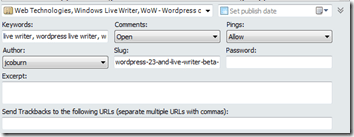
To add tags to your new blog post from within WLW, you’ll find the dialog box hidden at the bottom: