Windows Web Hosting, Web Technologies, etc
Web Technologies
Adding W3C Validation to WebMatrix
Jul 8th
One of the extremely cool features with IIS Developer Express is that you can extend it with the same modules you’d extend IIS7.5 with. Examples of popular modules are the IIS SEO Toolkit, FastCGI and WinCache.
Which are all included already. I’ve been looking for a module to add to it as an example that would bring value to web developers and came across a great post in Carlos Aguilar Mares blog titled: IIS SEO Toolkit and W3C Validation Service and I thought, That’s it! That’s a feature we could extend WebMatrix with that would bring value to web developers within the WebMatrix tool that is a perfect fit for the dev environment WebMatrix provides you.
How Carlos did it for IIS Servers
First if you haven’t visited Carlos’s blog, I recommend you do so (it’s another of the awesome IIS blogs). His article: IIS SEO Toolkit and W3C Validation Service talks about a sample project he created that basically takes your web content, runs it through the W3C HTML5 markup validation service and then returns a report of errors and warnings. The article was written around the current version of the IIS SEO Toolkit available for production, assumes you’re installing it on an IIS7 server and that you’re using the same version of IIS SEO Toolkit he’s using.
Unfortunately, we’re not using the same version of the IIS SEO Toolkit and not installing it on an IIS7 server but he was kind enough to give us the source so we’re good to go!
WARNING: In no way should I be confused as a professional programmer. I don’t know what I’m doing and if you follow the instructions from this point forward, proceed at your own risk.
How to add Carlos’s Extension to WebMatrix
We’re going to take 4 steps:
- Convert the project to .NET 4.0 (VS2010 does this for us)
- Recompile the DLL to use the same binaries for the Microsoft.Web.Management.SEO.Client and Microsoft.Web.Management references.
- Add the new DLL to the GAC
- Add a reference to the new DLL in the administration.config file for IIS Developer Express.
1. Converting the project to .NET 4.0.
This was the easy part. You’ll download the project, open it in VS2010, let it convert the project to VS2010 and then just go to Project –> SEOW3Validator Properties and change the Target framework.
While we’re in here, you should also update the Build Events. Carlos has it set to register the new DLL in the GAC and that’s throwing an error for me so I just removed the line by going to Build Events –> ‘Post-build event command line’ and removing the code in that box.
2. Update References and Recompile the DLL
There’s a reference to Microsoft.Web.Management and Microsoft.Web.Management.SEO.Client as shown below
We’ll delete those two references and then we’ll copy over these two DLL’s from our WebMatrix install, they can be found in:
“C:\Program Files (x86)\Microsoft WebMatrix”
(I actually copied over all of the Microsoft.Web.Management.* dll’s when I did mine)
once you’ve added these references back in pointing to the DLL’s where you downloaded them to (I put them in the project root folder and then just used the browse option to find them:
Then I recompiled the project and it compiled with 3 warnings all related to Microsoft.Web.Management.SEO.Crawler.Violation.Violation being obsolete.. but they were warnings and it compiled! WORKS FOR ME!
3. Add the new DLL to the GAC.
I used xcopy for this. I created a new folder:
C:\Windows\assembly\GAC_MSIL\SEOW3Validator\1.0.0.0__995ee9b8fa017847
and copied the DLL I just created to there. Only the SEOW3Validator DLL I created. If you don’t want to create this DLL yourself, you’re welcome to download the one I compiled, but you’re using it at your own risk and if you break something, blow up your computer or cause nuclear fallout, it’s your own fault for listening to me!
My DLL can be downloaded from here: SEOW3Validator-Jess.zip.
4. Add a reference in the Modules section of the administration.config file
This file can be found in:
C:\Program Files (x86)\Microsoft WebMatrix\config
You’ll open it up, look for the line: </moduleProviders> and just before that line, add this:
<add name="SEOW3Validator"
type="SEOW3Validator.SEOW3ValidatorModuleProvider, SEOW3Validator, Version=1.0.0.0, Culture=neutral, PublicKeyToken=995ee9b8fa017847" />
and then save the file.
That’s it, Let’s see it in action!
Now all we have to do is fire up WebMatrix, go to one of our projects and then run an SEO report just like we’d normally do:
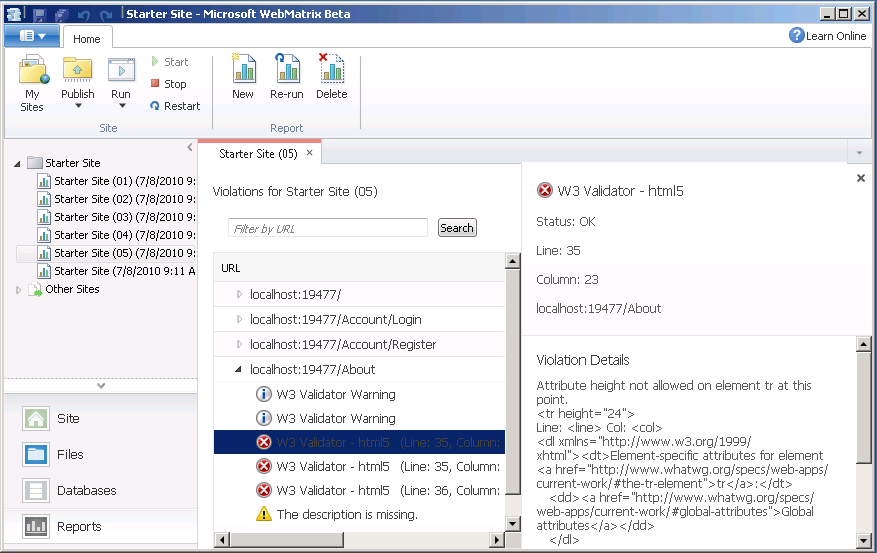
This fires up our site in IIS Developer Express and then sends each of the pages over to the W3C Validator a page at a time with a 1.5second delay between each page. After it’s done you’ll see the SEO report including the W3 Validator errors and warnings:
Where do we go from here?
Well hopefully someone finds this useful and takes up the project to extend it even further. I’d love to see this type of extension made a part of the WebMatrix tool actually, I think it’s a perfect component for it.
I hope you found my little article helpful. I’ve seen a lot of comments about WebMatrix and how it’s geared towards being a project for non-coders, noobs and ‘hobbyists’ (and most say how it is going to fail) but I don’t think that’s the case at all! Although it will allow that class of developers to use the tools and build a better web, it’s going to be equally useful for the seasoned developer. Best of all, it’s going to be useful for you whether you build your sites in custom .NET, custom PHP, in the new ASP.NET Web Pages or based off of open source applications like WordPress and DotNetNuke.
As I mentioned, I’m not a professional programmer but I considering programming (be it PHP, C#, VB, Perl, Bash Shell) a tool for the toolbox and I think if you’re a professional developer or designer WebMatrix should be another tool in your toolbox because it’s certainly one in mine!
JessCoburn.Com running on ARR! and that not be Pirate speak thar Matey!
Aug 9th
3 Blog posts to say “Hey I’m running on my site load balanced using ARR”. This is the third and hopefully last blog post for tonight. I posted two other posts tonight:
- Discusses the first stage of Applied Innovations Cloud Initiative.
- Discusses ARR & Load balancing.
All of this was to explain how I’m running my website currently (which I tend to test everything on first so I break it a lot but you have to break eggs to make cake, right?).
ARR or Application Request Routing is a new extension to IIS7 that allows you to turn a Windows Server (or VPS as in my case) into an Application Aware Load Balancer with such features as offloading compression and SSL encryption!
How I’m running JessCoburn.com
For the past year and a half, JessCoburn.com has (and continues to) run on a shared web hosting server that runs IIS7 on top of Windows Server 2008. My site is treated identically to how my customers sites are treated as I firmly believe in eating your own dog food (no not ALPO but using the same services you sell). The site makes use of FastCGI to run the PHP engine and backends to a shared MySQL server. All of our shared web servers connect to the SQL servers via a private dedicated gigabit network for optimal performance. In addition, I make use of expiry headers for output caching of my images and also use the wordpress plugin supercache to reduce my reliance on MySQL queries so my pages render faster. So that’s why it’s been fast, I think you’d agree that’s pretty well optimized for a Windows shared hosting website (same thing you could for as little as $8.33 a month with one of our Windows hosting accounts.. Sure it’s optimized but there’s still a problem.
What’s the problem with JessCoburn.com?
The problem is my web site runs on a single web server. This means if there’s maintenance on the box (don’t worry we do this during load traffic times) there’s still potentially downtime. This also means if my site ever gets popular enough to make the first page of DIGG or REDDIT (use those social bookmarks please) then no matter how much I optimize my site on that one web server, I could have a problem… These are the trade-offs we accept with shared hosting (today).
But what if, I could run JessCoburn.com on multiple web servers and load balance them? Yeah who’s going to go out and spend 20K to load balance his little wordpress blog (the profit margins aren’t that good you know). Well thanks to our own cloud computing initiative and the good folks on the IIS Team at Microsoft I can do just that for peanuts! Today!
My new configuration
I have a Windows 2008 VPS running IIS7 with ARR 2.0 Beta 2 on it. It’s of course running on our High Availability Managed Windows VPS Hosting Cluster. I also have JessCoburn.com still running on the shared Windows Hosting server running on IIS7 and I setup another VPS server running on top of Virtuozzo running Windows 2003 and copied the site there. Just to show that you can route requests to any kind of server. Both servers back end to the same MySQL server.
All requests for JessCoburn.com come into the ARR server and it then proxies these requests between the Shared Server and the Win2003 VPS server. In the event one of the sites crashes, is down or has problems, ARR will redirect all requests to the other server.
A little info about Application Request Routing (or ARR) in IIS7.
Aug 8th
In the 10 years I’ve been working with Windows as a web hosting platform (and the 15 or so I’ve been working with web servers period), I can confidently say that IIS7 is without question the best web server platform to date. Microsoft has been working on a plug-in for IIS called Application Request Routing (or ARR). The first version of ARR provided a suite of tools that allowed it to function as a Application Layer Load Balancer! The recently updated beta version extends that functionality and now makes it easy to turn a Windows Server running IIS7 into not only a Load Balancer but also a Reverse Proxy / Cache Server. Meaning you could potentially power a CDN using a bunch of Windows Servers.
What’s an Application Layer Load Balancer?
First I should define a load balancer. When you have a very popular website (think yahoo, Amazon, etc) you need a bunch of web servers to accept all those web requests. One server just won’t cut it. In order to keep things all tidy and in order you use a machine that controls those requests and which web server it goes to. You extend that machine and have it start monitoring your web servers and your web visitors and it can start managing those requests and directing it based on things like:
- The visitor’s browser type
- The visitor’s IP address
- The type of content being called (JPEG, MOV, HTML, ASPX, etc)
Then you get a step fancier and not only direct those requests based on the request but also on the state of the server, who’s had the most bandwidth, which server do you prefer requests to go to, which server is working hardest? etc.
Now the Layer 7 Load Balancer or Application Level Load Balancer can distribute requests based on the various application specific information. This could be a cookie for instance or information within your app itself.
NOTE: I’m not going to go into this any further you have the basic understanding of a load balancer and I’m not going to deal with NLB and layer 4 and all that fun stuff. Go Bing! it (yeah I said Bing!).
Wait aren’t load balancers expensive, complicated and require a whole other level of geek?
You bet! But they’ve gotten better and there’s a fair number of open source ones out there (in fact, I was reading earlier that wordpress.com was running on an open source one).
Well didn’t Windows Always have this?
Not really. Windows had Network Load Balancing which would allow you to run a couple servers with the same application on it. It would monitor ping on the machines and if one machine died all requests went to the other. So that was really load balancing at the machine level. This was good enough for most but what if the machine was fine but your service (perhaps IIS itself crashed?) . Then they had Clustering services. Now clustering services was service aware. Meaning if your service (perhaps IIS ) crashed on one of the machines it would failover to the other machines but it didn’t really know anything about your website’s application (perhaps an ecommerce store) so you could have a server online and the web service online but the actual application on that server failed and still be sending requests to it. So in comes those clever folks in the IIS team at Microsoft with Application Request Routing (ARR … Matey!).
Video Introduction to Application Request Routing and more info
Microsoft has a great video on ARR and it’s geared towards webhosts but does a fantastic job of showing the functionality of ARR and just how easy it is to configure and make use of. You can see that video on the IIS.net site at:
http://www.iis.net/extensions/ApplicationRequestRouting
In addition to the video they really spell out all of the features and benefits to ARR in detail. Some of those features include:
- HTTP based routing decisions.
- The ability to offload SSL requests
- The ability to offload compression
- Health monitoring of live traffic and specific URLs to monitor and adjust routing of requests.
- Support for extensive debugging through Failed Request Tracing Rules.
Instant search and access to great books
May 21st
Being a technologist all my life I’ve come to realize one thing: “to be good at what you do you can never stop learning”. (I also think to remain youthful at any age it’s important to never stop learning but that’s another conversation altogether.)
With that in mind you’re often confronted with a task that you don’t know the answer to. But if you know where to look for the answer chances are you find it quickly enough (yeah.. thank you Mr. Obvious). I’m doing some work with SQL Reporting and quite frankly my SQL query Kung Fu is weak. But there’s hundreds of books on the topic and available for me to review and here’s a few tips that will hopefully improve my SQL query Kung-Fu and become useful to you as well.
Doing the Book Search
Yes the web has everything and yes you can usually Google it up and find it on someone’s blog, some tutorial, some KB or something. But often you know what you really need is a good book to wrap your hands around and get up to speed. This week has been one of those items where I knew I could find the answer online (and got a few bits and pieces) but really needed a solid understanding and I wasn’t going to get that without diving into a good book. So I started looking. First I hit Amazon and did a search and then sorted based on reviews and found a few books that I thought would do the trick. So then I went to BarnesandNoble.com to see if they were instock anywhere near to my office (There’s a university nearby so they have a reasonable tech book collection.. reasonable being key). They had a couple SQL server data analysis books but not the ones I wanted “SQL Server Data Analysis with SQL and Excel”. Okay so now I don’t really know if this is the book for me or not. If they had it at the bookstore I could check it out before buying it. So now what?
Google’s Book Search
http://books.google.com was next. I went there and searched for my book and found a great deal of it available there! Ofcourse you get about half a page into a topic and find the next 6 pages missing but atleast you know this is probably the book for me.. But now we need to order the book and although I’m an amazon prime member and get free 2 day delivery, that’s not going to be until Tuesday and I want the book before the weekend. So I drop the extra bucks and get it overnighted but still my project is on hold..
Getting the book TODAY!
I really need this done today and being a proud iphone user and knowing amazon has Kindle for the iphone I thought Hrm… 3” display can’t be that bad… Yeah a few reviews on tech books say it really is so that’s out. Next is ofcourse O’Reilly’s safari books online (www.safaribooksonline.com) but they’re only O’Reilly… NOT!
Turns out they had all the books I needed and for $10 a month I got them today and am getting my project completed today (after this blog post goes up).
So here’s the Magic sauce to finding your book today and not tomorrow.
1. Identify the book you want by going to amazon.com and searching reviews.
2. Checkout the book online using books.google.com and reading through those books they have excerpts of online (amazon has a couple pages but I found google more comprehensive).
3. Check Safaribooksonline.com to see your book is there. Their search sucks though so you’re going to want to do a few searches before giving up on it not being there. They have all kinds of books and publishers listed there so it’s a good chance your book is there.
4. Get the book on safari and have a good at it. (for $10 a month you get 5 books so you can think of it as a $2 preview as to whether you’ll buy the book or not and it’s better to spend $2 to test a book than $50 to find out it stinks…)
5. Buy the book if you’re like me and need those physical pages to thumbnail and sticky note (I never write in my books though, I think that ruins them personally and somehow offensive) or to read in your ‘private library’ and you know the room I’m referring too.. it has great lighting, privacy and comfortable seating for one… yeah when you leave the room you flush and wash your hands (you do wash your hands, right?).
So that’s the tip, the golden nugget, the secret sauce in this blog post. get the reviews on amazon, read it on google and then trial it on safari and finally go buy it and get it shipped to you if you find it bookshelf worthy.
The easy way to create your first WordPress Theme.
May 6th
Tired of trying to find just the right wordpress theme? There’s millions of them to choose from afterall. Would love to create your own but have less artistic talent now than you did in Kindergarten with a box of busted chunks of crayolas? (You know what I’m talking about. First week of school you had brand new Crayolas by the second week they were all bits and pieces and nubs)
Well No worries! Artisteer to the the rescue! If you can use word, if you can click a couple buttons you can create your own WordPress theme with ease.
Creating your first wordpress theme is as easy as 1, 2, 3
After you download and install Artisteer you’ll want to run (uh duh, tell me something I didn’t know Jess). You’ll be prompted to pick what kind of theme you want to create and it supports more than just WordPress. In fact today it supports WordPress, Joomla, Drupal, an HTML template, an ASP.NET Application and a CodeCharge Studio Template (CodeCharge is for wannabe programmers just like us wannabe artists, I’ll talk about it in the next series and yeah, I use it too and no real programmers use it too).
Here’s the startup screen:
You’ll select WordPress and then get a screen like this:
Now with absolutely ZERO artistic ability and effort. I could export that theme and have just created my first WordPress theme. Let me show you how.
First you’ll click on the Export Button on the top right. and it will prompt you with a screen:
You’ll give it a name and set a path to where you want it to export to as I did above and then click the OK button to let the magic happen. Open up that folder you had it export to and ta-dah! There it is:
That’s it upload that folder to your wwwroot/wp-content/themes folder and you’ve got your own theme installed and ready to go.
Here’s my blog right now (that uses an artisteer theme)
and Here’s my blog with that new theme we just created selected as the theme to use:
Just as easy as 1, 2, 3 I was able to completely change up my blog’s design.
Making the Artisteer theme, your theme.
Here’s the thing. I don’t really care for the yellow sunburst, the palm trees or general layout of this theme so let’s change it up. By clicking the “Suggest Design” a few times, artisteer will randomly create some suggested designs for me and every time it’s something completely different.
After three clicks I got this:
I like the design, but I don’t care for the colors. So I click the suggest colors button a few times and I get:
Those are colors I can live with but I don’t like the background so guess what, I click suggest background:
Now I can go through and get suggestions for every element of my theme and I can also go in and tweak the particular features of the theme as well. Let’s look at the header. I want to change it up. So at the top I click Header and get a new menu bar at the top:
Now I can change the background image, the text location, add a foreground photo, etc, etc, etc.
With a little playing around (and don’t worry if you goof it up just click the undo button at the very top to roll back) this is what I came up with:
Yeah, I know what’ you’re thinking. That’s one scary clown Jess.. But you get the idea, you can tweak every single element of your theme and if you actually have (unlike me) more artistic talent than you did in kindergarten with those broken bits of crayola, it will look pretty nice.
If you haven’t grabbed artisteer yet, definitely do head over and give it a whirl.